
CROSS SCREEN MEDIA
MEDIA PLANNER: SMARTER SUMMARIES

The Gist
Background
Before Cross Screen Media, advertisers used disconnected tools and manual workflows. CSM brings TV, CTV, and digital together for smarter, data-driven planning.
Solution
A redesigned the summary section delivers a clearer, more actionable overview by surfacing core plan elements, audience insights, budget breakdowns, and reach metrics.
Problem
The Media Planner lacked immediate access to key metrics and users struggled to quickly assess and optimize campaigns.
Result
The new layout enables smarter, faster campaign adjustments and the average time on page increased by 30%, signaling deeper engagement.
Behind the Design
Role
Lead Product Designer
Responsibilities
UI, UX
Research
VQA
Timeline
4 Months;
Conception to Launch
Team
1 CTO
2 Engineers
1 Designer
Before Cross Screen Media, advertisers relied on fragmented tools and manual processes to plan and measure campaigns. Without a unified solution, advertisers often made decisions based on experience and estimates rather than precise, data-driven insights.
Cross Screen Media filled this gap by providing a comprehensive platform that streamlines planning, measurement, and optimization across CTV, social media, and traditional TV, enabling advertisers to allocate budgets more effectively and maximize campaign performance.
Background
Problem
CSM's original Media Planner enabled users to create a curated media plan and quickly generate an overview.
However, key details were not immediately visible, preventing users from efficiently assessing and optimizing their campaigns.
Without clear, readily available insights into key metrics, users struggled to make data-driven decisions that could enhance their campaign’s reach, efficiency, and return on investment.
Solution
We redesigned the summary section to provide a clear, intuitive snapshot of each media plan. The new UI surfaced key plan details, audience insights, budget allocation, and reach metrics so users can quickly assess performance and make informed adjustments.
30
%
30% Lift in Time on Page
After launch, the average time on page increased by 30%, signaling deeper engagement with the new layout.
01
Foundational Research
Contextual Discovery
User Research Informed by Training Principles
To design an effective summary section, I began by researching the needs of media planners and how they interact with campaign data. I first gathered insights from subject matter experts, internal stakeholders, and clients to identify the most critical information for decision-making. Through these discussions, I uncovered that media planners required a high-level overview to quickly confirm that their campaign settings, such as geography, budget, and audience criteria, aligned with their goals. However, they also needed a way to access more detailed insights without feeling overwhelmed by excessive data at the outset.
With these findings in mind, I moved into the ideation and prototyping phase. I explored different layouts and information hierarchies that would allow users to scan key details at a glance while maintaining access to deeper insights further down the page. Wireframes and low-fidelity prototypes helped test different approaches, ensuring that the summary section struck the right balance between clarity and depth. Usability testing played a crucial role in refining the design. Gathering feedback from real users allowed me to iterate on the structure and visual elements, ensuring that the final design was intuitive, engaging, and actionable. By prioritizing readability, accessibility, and seamless interaction, the redesigned summary section now enables media planners to efficiently assess their campaigns with confidence, reinforcing Cross Screen Media’s role as a trusted media planning tool.

Top Insights from Media Planners
Our research uncovered several key pain points that prevented media planners from working efficiently and making decisions quickly and confidently.
Defining Success
Planners need to maximize audience reach while staying within budget with clear visibility into TRPs, Optimized Reach, and cost allocation.
Data-Driven Decisions
Users need an intuitive way to compare proprietary optimized plans with traditional allocations to confidently select the best strategy.
Risks and Challenges
Clients must justify every dollar spent. Unclear data, inefficient workflows, or lack of confidence in plan performance can hinder adoption.
Stakeholder-Driven Data Visuals
To explore how best to present these metrics, I sketched a range of chart concepts, experimenting with different ways to balance clarity, detail, and usability for strength coaches. Charts were validated with our stakeholders to ensure usability.


Media Planner Persona
The insights gathered directly influenced my design approach and helped shape a user persona that captured the core priorities of media planners, ensuring the final solution aligned with real-world workflows and daily decision-making needs.

User Stories

After establishing the media planner persona, I developed user stories to guide and support design development.
As a media planner,
1
I want a unified view of my plan and key metrics, so I can quickly see if choices align with my goals.
2
I want to quickly review and adjust budget allocations to match strategic needs in real time.
3
I want to compare all plan types, so I can choose the best mix of TRPs and reach for my audience.
User Journey
Building on the media planner persona, I mapped the end-to-end user journey to visualize their experience across key campaign phases and uncover moments of friction, insight, and opportunity.


Opportunities for Business
I constantly refined the design requirement to tackle the core business challenges: adding value, increasing engagement, and improving retention.
Real-Time Adjustments
Presenting digestible, high-impact insights upfront allows users to quickly refine media plans before diving deeper.
Optimized Planning
Clear, glanceable data empowers users to fine-tune strategies in real time, keeping budgets and targeting aligned with goals.
Increased Retention
Making it easy to duplicate and tweak plans encourages exploration and builds long-term platform reliance.
02
Approach
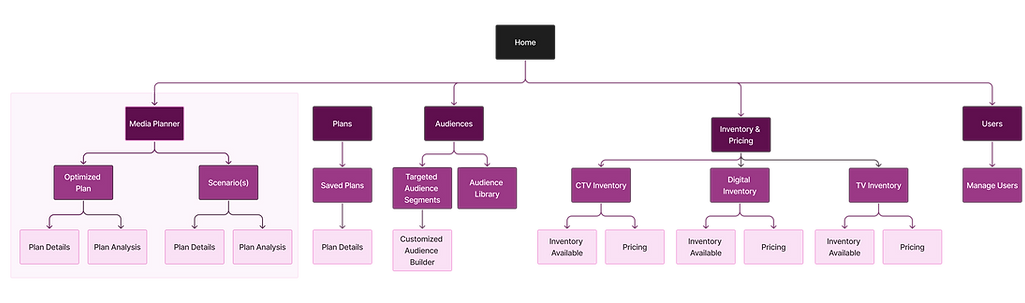
Streamlining Navigation
To improve efficiency, I designed an intuitive information architecture that aligned with strength coaches’ workflows. By structuring content around their key tasks—reviewing training phases, tracking progress, and collaborating, I created a seamless navigation system that reduced friction and improved decision-making.
Initial Wireframes
With the user journey and goals in place, I began wireframing to translate early concepts into structured layouts that supported clarity, decision-making, and usability. I prioritized content hierarchy to ensure key metrics were visible at a glance, and used low-fidelity wireframes to test how different visualization styles affected user comprehension.
Early iterations explored variations in data grouping, filtering, and layout density to strike a balance between detail and simplicity. Throughout the process, I collaborated with stakeholders and tested with users, both internal and external, to validate assumptions, refine interactions, and ensure the design aligned with how media planners think and work.


Enhancing the User Experience
This refinement in the design led to a clearer, more structured experience for coaches. To illustrate how users interact with the updated interface, I mapped out a user flow that outlines key actions and decision points within the platform.

03
Final Design
Final Design Walkthrough
To provide a complete view of campaign effectiveness, I proposed a three-part layout: one page each for TV, Digital, and Cross Screen. I focused on the Cross Screen section, where users assess exclusive reach, inventory efficiency, and exposure mapping. Reach metrics are prominently displayed to show both actual and potential reach, enabling planners to identify underperforming segments and adjust strategies accordingly.
By highlighting optimization opportunities and surfacing meaningful insights upfront, the final design empowers media planners to refine their approach, improve efficiency, and drive greater audience engagement across channels.


Design Refinement
This phase focused on strengthening clarity and hierarchy across the header, navigation, plan title section, action buttons, and summary section. Strategic refinements to layout, typography, and button hierarchy reduce clutter, reinforce global navigation, and surface key actions, making the experience easier to scan, interpret, and act on without increasing complexity.

Redesigning for Clarity and Functionality
The new layout introduces a structured hierarchy, allowing users to scan high-level campaign metrics first, then drill down into results segmented by TV buys (linear exposure), digital buys (CTV/online exposure), and combined cross-screen performance.


04
Measured Impact
Outcome
By clarifying hierarchy, elevating key insights, and reducing friction in decision-making, the updated Media Planner supports more confident and efficient campaign optimization. After launch, average time on page increased by 30%, indicating stronger engagement and a higher level of interaction with performance data, suggesting users were investing more time evaluating and refining their plans.